- Details
- Written by: INsane
- Category: NEWS
- Hits: 16252


Day of Defeat: Source in Single Player Mode ?
Windows or Linux Day of Defeat: Source didn't get "bots" or an AI program.
One third party mod called RCBot 2 (forum link will only work with Edge Browser/Bing) fixes that and I have installs for...
Post 19th Feb 2025 dod:s update. Note: The 2019 dodbits windows installer is retired. It only works on "previous beta"
For all server types see this download section.
Server types...
RCBot2 installed and need help with a problem?
Find the "FAQ INDEX" section below... Click "Read More" on how to install and configure bots!
The RCBot2 install downloads on dodbits are focused on Day of Defeat:Source ONLY.
RCBot2 has two other games (Team Fortess 2 and HL2:Death Match) so Waypoints for those and commands in configuration files will change for those games.
(RCBot2 only installs basic bot files and some waypoints )
Sorry, post 19th Feb 2025 update to DoD:S you have to use Proton and the windows files. I know I found a work around in 2024, but that no longer works.
Sorry... I don't support that, but looking at the raw files
However, I don't see why it wouldn't work if placed in the right place and manually configured.
Contact me if you are stuck or ask in the RCBot2 discord.
Yes, I know how to do that on Windows and Linux and have these on my local home server.
Most persons who run game servers do know as well.
But... if you don't know how to set up a game sever... don't ask me about RCBot2 installations on a game server.
Learn how to admin a game server first... by the time you do that, you will know why I don't help you over a month or two on this question.... "Can you help me install these on a server?"
That question is often asked and the person asking it has never run a game server... please don't be offended when I say no.
However I have an updated dedicated server guide for a LAN server that is much the same, see that here.
That depends on what you (or Steam or me or RCBot2) did wrong. Mostly It's when the installation directory selected is wrong.
In a lot of cases it people who have steam installed on a C drive and Day of Defeat: Source installed on another drive, like D or E drives.
For just about every nine in ten "it didn't work" plea's for help... the wrong folder's location was selected.
The other one in nine didn't configure the bots correctly to start or started the game in a secure mode and ... the program needed "-insecure" on the launch options to work.
Read the README.... first.
Link back to the help section list.
This is easy. To find your dod folder…
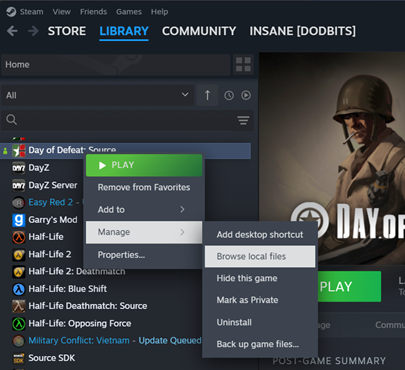
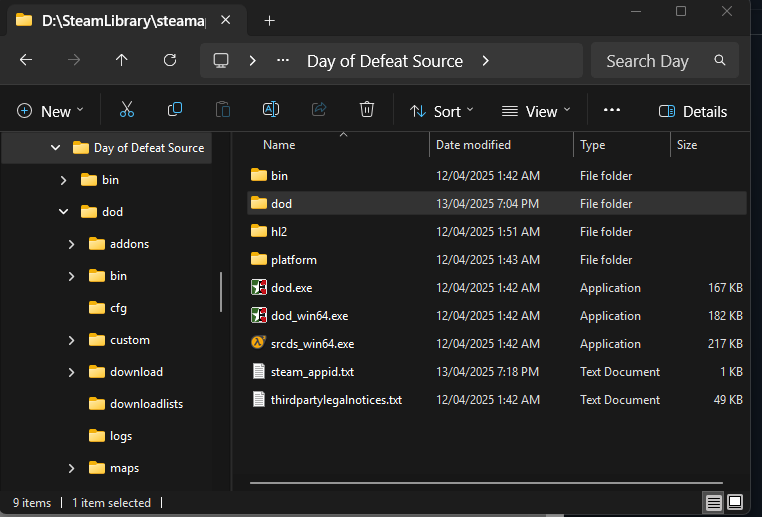
This is a critical skill in modifying dod:s as almost all custom content will go in "dod" folder and its sub folders.
3. My game, shortcuts work but no bots are there.
Check this area of the config.ini file...
#
# To enable "Auto Bot Quota" set the interval to a value above 0 (e.g. 5) (unit is seconds)
# This interval is used to check the human/bot player count
# For more information see bot_quota.ini
rcbot_bot_quota_interval -1
#
# Or use these settings (but dont use them together with the above setting!)
rcbot config min_bots -1
rcbot config max_bots 30
#
If your config.ini is not like that make some changes.
The Auto Bot Quota system is what dedicated servers can use for a Human - Bot quota, that is if a human joins the server a bot will leave. The file "bot_quota.ini" has all the details if you open that and read it.
If you are in doubt on a server size and you are running a Listen Server, just select rcbot config max_bots 30 as for a local PC you can set that to antthing you like as you load games via "Create Server" and the "Game" tab does have a Max players setting.
See the following sections as it could also be a incorrect desktop shortcut or the RCBot2 configuration files too.
4. Steam URL style desktop shortcut isn't starting RCBot2
Let's say you had RCBot2 working in 2019-Feb 2023...and now the desktop shortcut now doesn't.
Or you placed "-insecure" in the Steam Library, then created a desktop shortcut and RCBot2 doesn't start.
It doesn't work past 2023, sure the game starts...but Steam now ignores the launch options for "security" reasons... likely a good idea as it got exploited in 2022.
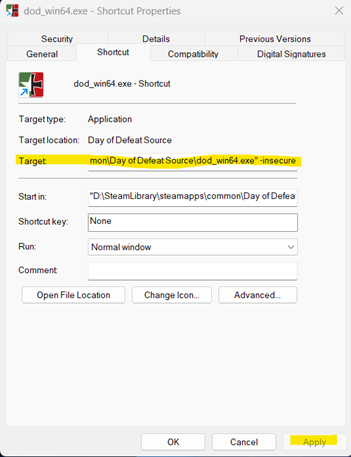
You can make a new (windows) shortcut manually from the game folder after the 19th Feb 2025 update.
In the folder you will see a .exe “dod_win64.exe”
Right click and select "Send to - desktop (create shortcut)"
(see image below) In "Target:" put a space after the address and put this in… -insecure
e.g.: if your address was in the D: drive it should now look like this...
"D:\SteamLibrary\steamapps\common\Day of Defeat Source\dod_win64.exe" -insecure
5. My game starts OK, I see the RCBot2 message joining the server but no bots are there.
It's likely commands are wrong or missing in the "config.ini" file. Please see FAQ Item 3.
You may also have missed another message after the RCBot2 Welcome message... "There are no waypoints for this Map". That means the bots are there but in spawn and not moving. You need waypoints for them. Check here and see if there are any new ones.
6. RCBot2 is set at 32 players, I want less players.
A "10" "16" "30" or 32 player amount was chosen as a default in install files so players who don't read the readme can at least start the game and play.
It is best on a Listen server (local PC) to adjust to rcbot config max_bots 30 (see FAQ Item 3)
There is an easy way to default the player size down to what you want.
The server player maximum is now set via the Valve command "maxplayers" and will be set for all maps until you change it again.
You can manually change this in the developer console as well but note...
That's about all, mostly the most basic items that stop this bot working is wrong file addresses and files changed that were from poor understanding on what this program needs to run.
You know what...if Day of Defeat:Source had a Steam Workshop... most of these problems would not be there.
Hope that helped.
INsane dodbits.com