- Details
- Written by: INsane
- Category: Military Conflict: Vietnam
- Hits: 1124


This key pad menu is a tool to help edit navigation mesh (.nav) files used in MCV.
Important links ....
This download has a PDF readme. Click here to read it now.
An article may be added when I have more time but all you need to do is read the readme.
It's a menu to help edit source game navigation mesh files. Click on the image below....
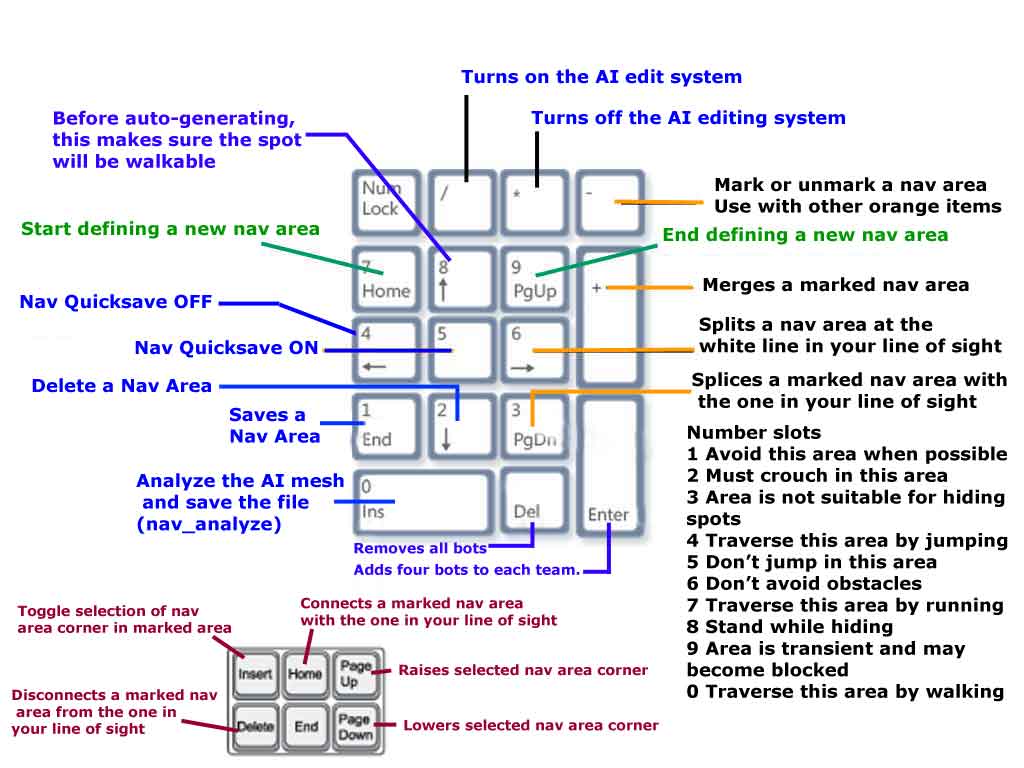 |
| Key Pad assignments |
I used this to make some edits to custom maps in the steam MCV workshop map section.
They are ports of my most loved dod:s maps, dod_donner, dod_anzio, dod_lennon, dod_palermo and dod_argentan.
A download of the .nav files for those maps is here. Most had edits required around the spawn.
I found a interesting error when making a .nav file for dod_kalt.
I got this error... "No walkable seed positions"
There is a fix (roachisserie chicken guide for Garrys Mod) here.
From that guide...
"No walkable seed positions" Error
If you followed the section above closely, and you DON'T get this error, move on to the next step.
If you have put "nav_generate" into the console and it returns the error above. Then the solution is simple.
Unpause the game and look at the ground, (it doesn't matter where) and then re-open the console.
Type "nav_mark_walkable"
When you unpause, if you did it right, you'll see a purple triangle made out of wireframe.
Open the console once more and then type "nav_generate".
The Nav should generate now. If it generates but your map has a spawn-room that's separate from the actual map, then follow the next step.
INsane.