- Details
- Written by: INsane
- Category: Day of Defeat Source HUDs
- Hits: 10026


 Sections
Basic description of the Capture Panel
 |
 |
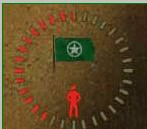 |
| Modified Axis | Modified Neutral | Modified Allied |
 }
    HudCapturePanel
    {
        "fieldName"           "HudCapturePanel"
        "xpos"                  "c-75"
        "ypos"                  "c80"
        "wide"                  "150"
        "tall"                     "90"
        "visible"                "1"
        "enabled"              "1"
        "icon_space"         "2"
    }
resource\ui\hudcapturepanel.res: This file deals with the items inside the defined area made by the hudlayout.res... a small area of 160 wide x 90 high.
There items are...
They are all simple to adjust, use my test maps to view the changes as you edit on the fly.
"Resource/UI/HudCapturePanel.res"
{
    "CapturePanelAlliesFlag"
    {
        "ControlName"    "ImagePanel"
        "fieldName"        "CapturePanelAlliesFlag"
        "xpos"            "55"
        "ypos"            "20"
        "wide"            "40"
        "tall"            "40"
        "visible"        "1"
        "enabled"        "1"
        "scaleImage"    "1"
        "image"            "Flag_USArmy"
    }
    "CapturePanelAxisFlag"
    {
        "ControlName"    "ImagePanel"
        "fieldName"        "CapturePanelAxisFlag"
        "xpos"            "55"
        "ypos"            "20"
        "wide"            "40"
        "tall"            "40"
        "visible"        "1"
        "enabled"        "1"
        "scaleImage"    "1"
        "image"            "Flag_Wermacht"
    }
    "CapturePanelNeutralFlag"
    {
        "ControlName"    "ImagePanel"
        "fieldName"        "CapturePanelNeutralFlag"
        "xpos"            "55"
        "ypos"            "20"
        "wide"            "40"
        "tall"            "40"
        "visible"        "1"
        "enabled"        "1"
        "scaleImage"    "1"
        "image"            "Flag_Neutral"
    }
    "CapturePanelPlayerIcon1"
    {
        "ControlName"    "ImagePanel"
        "fieldName"        "CapturePanelPlayerIcon1"
        "xpos"            "69"
        "ypos"            "52"
        "wide"            "12"
        "tall"            "24"
        "visible"        "1"
        "enabled"        "1"
    }
    "CapturePanelPlayerIcon2"
    {
        "ControlName"    "ImagePanel"
        "fieldName"        "CapturePanelPlayerIcon2"
        "xpos"            "69"
        "ypos"            "52"
        "wide"            "12"
        "tall"            "24"
        "visible"        "1"
        "enabled"        "1"
    }
    "CapturePanelPlayerIcon3"
    {
        "ControlName"    "ImagePanel"
        "fieldName"        "CapturePanelPlayerIcon3"
        "xpos"            "69"
        "ypos"            "52"
        "wide"            "12"
        "tall"            "24"
        "visible"        "1"
        "enabled"        "1"
    }
    "CapturePanelPlayerIcon4"
    {
        "ControlName"    "ImagePanel"
        "fieldName"        "CapturePanelPlayerIcon4"
        "xpos"            "69"
        "ypos"            "52"
        "wide"            "12"
        "tall"            "24"
        "visible"        "1"
        "enabled"        "1"
    }
    "CapturePanelPlayerIcon5"
    {
        "ControlName"    "ImagePanel"
        "fieldName"        "CapturePanelPlayerIcon5"
        "xpos"            "69"
        "ypos"            "52"
        "wide"            "12"
        "tall"            "24"
        "visible"        "1"
        "enabled"        "1"
    }
    "CapturePanelProgressBar"
    {
        "ControlName"        "ImagePanel"
        "fieldName"            "CapturePanelProgressBar"
        "xpos"                "30"
        "ypos"                "0"
        "wide"                "90"
        "tall"                "90"
        "visible"            "1"
        "enabled"            "1"
        "scaleImage"        "1"
        "image"                "progress_bar"
        "color_active"        "HudProgressBar.Active"
        "color_inactive"    "HudProgressBar.InActive"
    }
    "CapturePanelMessage"
    {
        "ControlName"        "Label"
        "fieldName"            "CapturePanelMessage"
        "xpos"                "15"
        "ypos"                "70"
        "wide"                "120"
        "tall"                "24"
        "visible"            "1"
        "enabled"            "1"
        "autoResize"        "0"
        "pinCorner"            "0"
        "tabPosition"        "0"
        "labelText"            " "
        "textAlignment"        "center"
        "dulltext"            "0"
        "brighttext"        "0"
        "font"                "ChatFont"
    }
    "CapturePanelBackground"
    {
        "ControlName"    "Panel"
        "fieldName"        "CapturePanelBackground"
        "xpos"            "30"
        "ypos"            "0"
        "wide"            "90"
        "tall"            "90"
        "visible"        "1"
        "enabled"        "1"
    }
}
resource\clientsheme.res:
The color control for the small man icons "CapturePanelPlayerIcon1" - "CapturePanelPlayerIcon5" in the clientscheme.res file are found on line 291 ...
        "color_active"       "HudProgressBar.Active"     // The color before the count starts
        "color_inactive"    "HudProgressBar.InActive"  // The color the bar goes when counting down
     "color_active"      "255 255 255 200"  //"HudProgressBar.Active"      The color before the count starts
     "color_inactive"    "200 0 0 200"       // "HudProgressBar.InActive"      The color the bar goes when counting down

