Back to dodbits.com
Copyright dodbits.com 2005            Copyright explained... FFS... show some damn backbone and make your own n00b  :)
Kills, Death and Capture Notices.

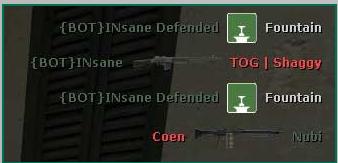
The background.

There are two methods you can use here, the first is editing the ClientScheme.res file and the other is editing the HudLayout.res file (dod\scripts).

1st method...

Getting rid of the Background completely.


To clear the death notice background, look for this group around the top of the ClientScheme.res file…


                "HudBackground"                                        "123 110 59 184"
                "HudBackgroundActive"                        "240 207 78 117"
                "HudBackgroundUnusable"                        "192 28 0 140"
                "HudBackgroundActiveSolid"                "240 207 78 180"


Change.. "HudBackgroundActiveSolid"                "0 0 0 0"

The death notices will no longer have any background at all, again adjusting the ClientScheme.res file may not be what you want... because it will affect other areas in the HUD that refer back to this "colour". 

2nd method...

Adjusting the background to different colours.


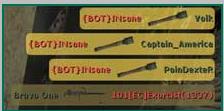
If you do want a background, and just need to change the color of the notices the that are YOUR caps / kills / deaths… and OTHERS caps / kills / deaths?

(or just want to get rid of the backgounds in this area of the HUD only)

You can adjust those the two, (your kills/deaths or others kills/deaths) in a separate place as well, the ClientScheme.res file sometimes adjusts colours for more than one item.
But especially for the death notice backgrounds you can edit the HudLayout.res file in the (
dod\scripts) folder...


HudDeathNotice
{
"fieldName" "HudDeathNotice"
"visible" "1"
"enabled" "1"
"xpos" "r640"
"wide" "640"
"tall" "480"

"MaxDeathNotices" "4"
"LineHeight" "20"
"RightJustify" "1" // If 1, draw notices from the right

"TextFont" "ChatFont"
"CTTextColor" "CT_Blue"
"TerroristTextColor" "T_Red"

"BackgroundColor" "HudBackground"
"ActiveBackgroundColor" "HudBackgroundActiveSolid"


Those last two lines are what you need, the top one "BackgroundColor", is other people and in this case it is a darker translucent black than the "HudBackgroundActiveSolid" that referrers back to the ClientScheme.res file (in my ClientScheme.res file it is set at blank "0 0 0 0" as above).

You can also change the lower one here as well to a colour you want...

"BackgroundColor" "0 0 0 150"

"ActiveBackgroundColor" "240 30 30 255"

In this mixture the top (other people) is dark translucent black.
The bottom one (
you) is a bright red... yuk... but you get the idea...
Back to... DoD Source Customizing your Hud. HUD Main Page